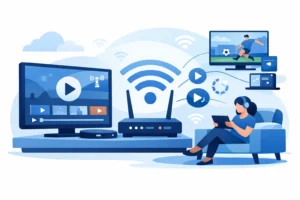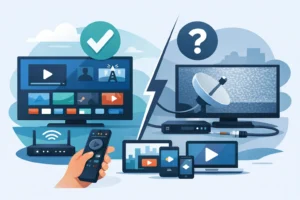
Cable bills keep rising, sports are split across apps, and the device under your TV can decide whether streaming feels easy or frustrating. In the Formuler Box vs Firestick decision, the best choice comes down to one question: do you want a dedicated IPTV experience, or an affordable all-purpose streaming stick?
Both devices can deliver live TV, movies, series, and sports over a reliable internet connection. But they are built for different kinds of viewers. A Firestick is compact, inexpensive, and familiar. A Formuler box is purpose-built for IPTV, with a TV-style interface and stronger controls for people who watch live channels every day.
Formuler Box vs Firestick at a Glance
A Firestick is Amazon’s streaming device. It plugs directly into an HDMI port, connects to Wi-Fi, and gives you access to popular streaming apps through the Fire TV interface. It is a simple choice for viewers who already use Prime Video, Netflix, YouTube, and other mainstream services.
A Formuler box is an Android-based media player designed around IPTV. Rather than treating live TV as one app among many, it puts channel navigation, program guides, favorites, catch-up features, and recording options at the center of the experience. Its remote is made for channel surfing, not just searching for apps.
The Firestick usually wins on upfront price and portability. The Formuler box usually wins on the way it handles an IPTV subscription over the long term. If your main goal is live sports, international channels, local programming, and a large TV-first lineup, that difference matters.
Choose a Formuler Box for a True IPTV Setup
A Formuler box is the stronger option for households that use IPTV as their main television service. It feels closer to a traditional cable box, but without the cable contract, hardware rental fees, or limited channel packages.
The biggest advantage is the interface. Formuler devices are designed to make live television fast to use. You can move through a full electronic program guide, jump between favorite channels, search a channel list, and return to recently watched content with fewer clicks. That is especially useful during a live game when you want to switch from an NFL matchup to NHL coverage or a news channel without opening and closing apps.
Many Formuler models also support features that heavy viewers appreciate, including recording support, time-shift options, external storage compatibility, Ethernet connectivity, and 4K playback. Available features vary by model and IPTV app, but the platform is clearly built for people who want more control than a basic streaming stick provides.
Wired internet is another major benefit. Wi-Fi can work well, but crowded homes, thick walls, and multiple connected devices can affect stream stability. A Formuler box with an Ethernet connection gives your live TV setup a more consistent foundation. For viewers who are tired of buffering during a major UFC card or playoff game, this is a practical upgrade.
Formuler is also a better fit for shared households. If different family members watch different language channels, sports, movies, and series, a well-organized IPTV interface makes a large content library easier to manage. It is built for volume, not just occasional viewing.
Where Formuler Falls Short
A Formuler box costs more than a basic Firestick and takes up more space near the television. Setup is still straightforward, but it may feel less familiar to someone who only wants a few mainstream apps and does not care about a detailed live TV guide.
It is also less portable. You can take it from room to room, but it is not as convenient as putting a small streaming stick in a travel bag. If you mainly stream movies on weekends and already like the Amazon Fire TV layout, a dedicated IPTV box may be more device than you need.
Choose a Firestick for Low-Cost Flexibility
The Firestick is popular for a reason. It is small, easy to find, simple to install, and works with nearly any modern TV that has an HDMI port. Plug it in, connect to Wi-Fi, sign in, and you have a familiar streaming platform in minutes.
For casual viewers, that convenience is hard to beat. Fire TV gives you one place for mainstream apps, music, casual streaming, and compatible IPTV players. It is an efficient option for a bedroom TV, a second television, a dorm room, or travel.
The Firestick also has a low barrier to entry. You do not need to replace your television or buy a large media box to start streaming. For budget-focused cord-cutters, it offers a fast way to turn an older TV into a smart entertainment screen.
With the right IPTV player and a stable connection, a Firestick can handle live channels, HD content, and many 4K streams. For one or two people who want a straightforward setup, it can deliver a lot of value.
Where Firestick Can Feel Limited
The Firestick is not designed solely for IPTV. Its home screen prioritizes Amazon’s ecosystem, recommendations, and app discovery. That can make the experience feel cluttered when all you want is to open live TV and start watching.
Navigation is also less TV-focused. Using an IPTV app on Firestick can be perfectly functional, but it may involve more clicks to reach channel groups, favorites, or guide settings. The remote is compact, which is convenient, but less comfortable for viewers who spend hours moving through live channels.
Storage and performance can become concerns on lower-end or older Firestick models. Installing multiple apps, keeping them updated, and running demanding 4K streams may slow the device down over time. A current 4K-capable Firestick is a better choice than an entry-level model if picture quality and speed are priorities.
Finally, most Firesticks rely on Wi-Fi. You can improve the connection with a compatible Ethernet adapter, but that adds another accessory and reduces the simple plug-in appeal. If your Wi-Fi is inconsistent, a wired Formuler box is often the cleaner solution.
Picture Quality, Sports, and Stream Reliability
Neither device can create quality that your internet connection or content source does not provide. A 4K-capable device needs a strong connection, and the stream itself must be available in 4K. For HD live sports, a stable connection is often more valuable than chasing the highest resolution number.
For best results, use strong home internet, place your Wi-Fi router where the signal can reach the TV, and avoid running large downloads while watching important live events. If possible, connect a Formuler box by Ethernet. This reduces the variables that can lead to freezing, delayed playback, or sudden drops in picture quality.
The device also matters when channels are changing quickly. Formuler boxes generally feel more natural for sports fans because the remote, guide, and live-TV layout are designed for rapid navigation. Firestick works well when you know exactly what app or channel you want, but it can feel more like using an app than watching television.
Which Device Is Right for Your Home?
Choose a Formuler box if IPTV will be your primary source of live TV. It is the better long-term choice for viewers who want a cable-box feel, a full guide, quick channel switching, Ethernet support, and a cleaner experience for daily sports and television.
Choose a Firestick if you want the lowest-cost entry point, a portable device, and access to a broad app ecosystem. It is ideal for secondary TVs, occasional IPTV viewing, or households that already prefer the Fire TV environment.
For a main living-room setup, especially where sports, international content, and live channels are watched every day, the Formuler box usually justifies its higher price. For a simple extra screen or flexible travel device, Firestick remains a smart value.
Get More From the Device You Choose
The best hardware cannot fix a weak content package or unreliable service. Choose a compatible IPTV plan with the live channels, sports coverage, movies, and series your household actually watches. Make sure the plan supports the number of simultaneous screens you need, then match the device to how each TV is used.
PureVisionHD supports flexible IPTV viewing across compatible devices, including Firestick and Formuler setups, so you can build around your home instead of being locked into a cable company’s equipment. Put the dedicated box where live TV matters most, use a Firestick where flexibility matters more, and give every screen a setup that makes watching simple.