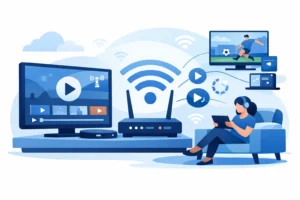
If you are tired of buffering on bargain Android boxes, this yokatv box review gets straight to the point: YokaTV is built for people who want IPTV to work fast, look clean, and stay simple. For North American viewers watching live sports, local channels, movies, and daily series, that matters more than fancy specs on a product page.
A lot of streaming boxes promise 4K, fast Wi-Fi, and easy setup. The real test is what happens when you are switching between live channels, opening apps, loading the TV guide, or trying to watch a game without lag. That is where a YokaTV box stands out. It is not just about raw power. It is about giving IPTV users a smoother, more stable experience with less setup friction.
YokaTV box review: what it does well
The biggest strength of YokaTV is convenience. This is the kind of box that appeals to cord-cutters who do not want to spend an hour tweaking settings just to get live TV running properly. The interface is straightforward, app installation is simple, and navigation usually feels quicker than what you get on generic low-cost boxes.
For IPTV users, that speed matters. When your box is underpowered, everything starts to feel slower than it should. Menus hesitate, streams take longer to load, and switching between channels becomes annoying. YokaTV generally avoids that problem by focusing on the basics that matter most – decent processing power, solid app compatibility, and a user experience that does not feel cluttered.
Another plus is format flexibility. Most buyers looking at a box like this are not just watching one app. They want live TV, sports packages, video-on-demand libraries, and maybe a few regular Android streaming apps on the same device. YokaTV handles that kind of mixed use better than the cheapest boxes on the market.
Setup and day-to-day use
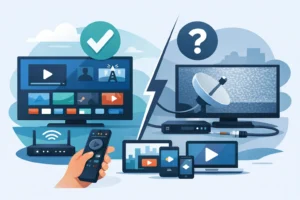
Setup is one of the main reasons buyers choose a dedicated IPTV box instead of relying only on a smart TV app. Smart TVs can work, but they are not always fast, and app support can be inconsistent. A YokaTV box gives you a more controlled environment.
The initial setup is usually simple enough for non-technical users. Connect it to your TV, sign in to your Wi-Fi or Ethernet, install your preferred IPTV player or portal, and start streaming. If you already know how to use Android-based streaming devices, there is almost no learning curve.
Day to day, the value shows up in the small things. The home screen stays responsive. Apps open without dragging. Channel changes feel quicker. If you watch a lot of live sports, that smoothness is not a bonus – it is the reason to buy the box in the first place.
Ethernet support is especially important here. Wi-Fi is fine in many homes, but wired internet still gives the most stable experience for HD and 4K live streams. If your priority is reliability over convenience, using Ethernet with YokaTV makes more sense than trying to push everything through weaker home Wi-Fi.
Picture quality and streaming performance
Most buyers searching for a yokatv box review want to know one thing first: does it actually stream well? In practical terms, yes – assuming your internet connection and IPTV provider are doing their part.
A box cannot fix a weak source feed or poor home internet. What it can do is avoid adding more problems. YokaTV performs well when it comes to decoding HD and 4K content, keeping playback smooth, and supporting the apps that IPTV customers actually use. That makes it a good match for households watching sports, 24/7 live channels, and large on-demand libraries.
The difference becomes clear during peak viewing hours. On lower-end devices, prime-time streaming can feel unstable because the box itself struggles with app performance or memory limits. YokaTV is better suited for sustained use, especially if you are opening large channel lists, browsing categories, or switching from live TV to movies and back again.
That said, expectations should stay realistic. You are not buying a premium gaming console or a flagship media powerhouse. You are buying a practical IPTV-focused device. For that job, it does what most viewers need: fast playback, clean video, and fewer slowdowns than generic alternatives.
App compatibility and IPTV support
This is where YokaTV becomes more attractive for cord-cutters. A streaming box is only as useful as the apps it runs well. For IPTV buyers, that means support for popular player apps, portal-based services, M3U playlists, EPG loading, and VOD browsing.
YokaTV fits that use case well because it is designed with IPTV viewing in mind. You are not forcing a general-use device into a TV-first setup. That translates into a better living room experience, especially for users who want fast access to channel groups, sports categories, and regional content.
It is also a better fit for households that want one simple box for everything. If you have family members who just want to turn on the TV and start watching without asking which input or app to use, a dedicated IPTV box helps keep things simple.
For users in Canada and across North America, that matters even more. A lot of homes want a mix of U.S. channels, sports networks, international content, and local coverage in one place. A device like YokaTV is useful because it keeps that content accessible without making the setup feel technical.
Who should buy a YokaTV box
YokaTV makes the most sense for buyers who want a dedicated IPTV setup instead of piecing together a streaming system from random apps and older devices. If you watch live TV daily, follow major sports, or want a cleaner replacement for cable, this type of box is a practical upgrade.
It is a strong option for sports fans in particular. Live sports expose weak hardware fast. If your box struggles with quick channel changes, high-motion playback, or guide loading, game day becomes frustrating. YokaTV is better suited for that workload than many entry-level Android boxes.
It is also a good fit for multicultural households that switch between different channel groups and languages. When you are browsing a large content lineup, speed and organization matter. A more capable box makes the entire experience less annoying.
If your current setup already works well on a high-end device, the upgrade may not feel dramatic. This is one of the trade-offs. YokaTV is not magic. It is most valuable when you are moving up from a weak box, an outdated smart TV interface, or a setup that feels unstable.
Where it falls short
No honest review should act like every buyer gets the same result. YokaTV still depends on your internet speed, app choice, and service quality. If your provider has poor uptime or overloaded streams, the box will not solve that.
There is also the question of budget. If you only stream occasionally and mostly use mainstream apps, a basic streaming stick may be enough. YokaTV is easier to justify when IPTV is your main source of entertainment, not just an occasional extra.
Some buyers also expect every Android box to behave exactly like a premium mainstream platform. That is not always realistic. YokaTV is optimized for practical streaming use, especially IPTV, but user experience can still vary depending on the app ecosystem and how much multitasking you expect from it.
YokaTV box review: is it worth it?
For the right buyer, yes. If your goal is stable IPTV viewing, quicker navigation, better support for live TV apps, and a simpler cable-replacement setup, YokaTV is worth serious consideration. It is especially useful for viewers who care about sports, 4K streams, and large channel packages across North America.
The key advantage is not that it does one flashy thing better than everything else. It is that it handles the full IPTV experience more reliably than the cheap boxes that flood the market. That means less waiting, less freezing, and less frustration.
If you pair it with a stable internet connection and a dependable service, the result is a much better living room setup. That is why boxes like YokaTV continue to attract buyers who want fast setup, broad compatibility, and a more dependable way to watch live TV. For anyone replacing cable and wanting a box that feels built for the job, this is a smart place to start.